
Cloud storage has become an essential part of modern digital life.
From personal photos and videos to business documents and remote work files, people now rely heavily on online storage platforms to keep data accessible, organized, and secure.
But choosing the right cloud storage service is not always easy.
Some platforms focus on:
- Privacy
- Collaboration
- File sharing
- Security
- Business storage
- Large free plans
- Fast syncing
while others prioritize ecosystem integration or productivity tools.
In this guide, we compare the best cloud storage services in 2026 based on:
- Free storage space
- Security
- Speed
- Device compatibility
- Backup features
- Collaboration tools
- File sharing
- Pricing
Whether you need storage for personal files, business collaboration, content creation, or secure backups, this guide will help you choose the best cloud storage platform.
What Is Cloud Storage?
Cloud storage allows users to store files online instead of relying only on physical devices like:
- Hard drives
- USB drives
- Local computers
Files are uploaded to remote servers and can be accessed from:
- Smartphones
- Laptops
- Tablets
- Web browsers
- Multiple devices
Cloud storage services also help protect files from:
- Hardware failure
- Theft
- Accidental deletion
- Device damage
Why Cloud Storage Is More Important Than Ever
Modern users generate huge amounts of digital data including:
- Photos
- Videos
- Documents
- Work files
- Social media content
- Creative projects
At the same time, remote work and cross-device access have increased demand for reliable cloud syncing.
Cloud storage helps users:
- Access files anywhere
- Share documents easily
- Collaborate remotely
- Back up important data
- Save device space
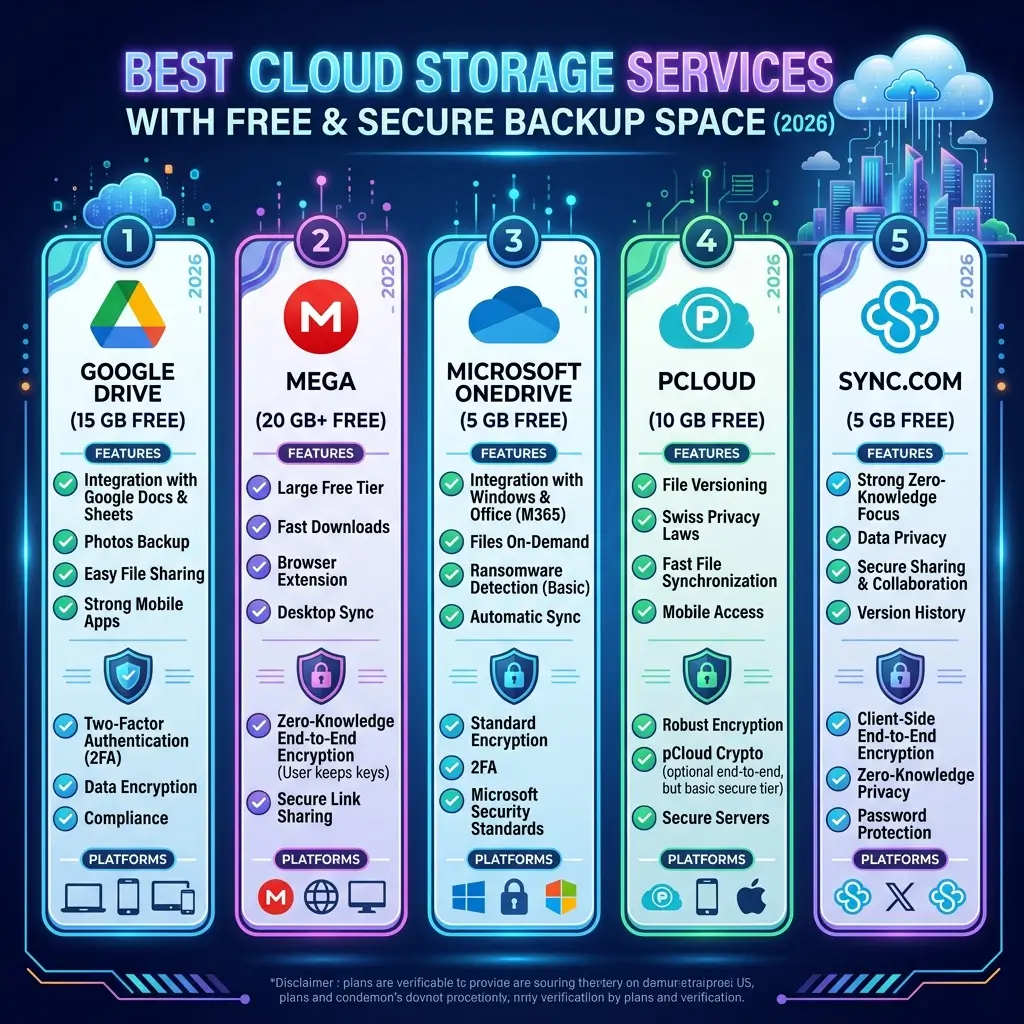
Best Cloud Storage Services in 2026
1. Google Drive — Best Overall Cloud Storage Service
Best For
- Everyday users
- Students
- Collaboration
- Productivity
Pros
- Excellent collaboration tools
- Strong integration with Google Workspace
- Easy file sharing
- Reliable syncing
- Generous free storage
Cons
- Privacy concerns for some users
Why It Stands Out
Google Drive remains one of the most widely used cloud platforms because it integrates seamlessly with:
- Google Docs
- Sheets
- Gmail
- Android devices
It is especially useful for collaborative workflows and remote teams.
2. Dropbox — Best File Syncing Experience
Best For
- Fast syncing
- Professional workflows
- Team collaboration
Pros
- Excellent sync reliability
- Smart file management
- Easy sharing
- Strong desktop apps
- Cross-platform support
Cons
- Smaller free plan compared to competitors
Why Professionals Use It
Dropbox became popular because of its smooth syncing experience.
It remains highly reliable for:
- Creative professionals
- Agencies
- Business collaboration
3. Microsoft OneDrive — Best for Windows Users
Best For
- Windows integration
- Microsoft Office users
- Business environments
Pros
- Deep Windows integration
- Office collaboration
- Strong business tools
- Automatic backup options
Cons
- Less appealing outside Microsoft ecosystem
Why Office Users Prefer It
OneDrive works exceptionally well with:
- Windows PCs
- Microsoft 365
- Teams
- Office documents
This makes it ideal for corporate workflows.
4. iCloud — Best for Apple Users
Best For
- iPhone users
- Mac users
- Apple ecosystem syncing
Pros
- Seamless Apple integration
- Automatic photo backups
- Easy device syncing
- Strong ecosystem support
Cons
- Limited flexibility outside Apple devices
Why Apple Users Like It
iCloud works naturally across:
- iPhones
- iPads
- Macs
- Apple Photos
- Apple backups
For users deeply invested in Apple products, it offers excellent convenience.
5. pCloud — Best Privacy-Focused Cloud Storage
Best For
- Privacy-conscious users
- Secure file storage
- Long-term backups
Pros
- Optional client-side encryption
- Lifetime plans available
- Strong file security
- Media streaming support
Cons
- Encryption costs extra
Why Privacy Users Prefer It
pCloud focuses heavily on secure storage while offering flexible pricing models.
It is popular among users who want greater control over file privacy.
6. MEGA — Best Free Storage Space
Best For
- Large free storage
- Privacy-focused users
- Media storage
Pros
- Large free plan
- End-to-end encryption
- Secure sharing
- Good mobile apps
Cons
- Transfer limitations on free accounts
Why Users Choose It
MEGA became widely known for offering generous free storage while emphasizing encrypted file storage.
7. Sync.com — Best Secure Cloud Storage for Businesses
Best For
- Secure business storage
- Encrypted collaboration
- Privacy-focused teams
Pros
- End-to-end encryption
- Strong privacy protections
- Secure sharing
- Business collaboration tools
Cons
- Slower syncing than some competitors
Why Security-Conscious Teams Use It
Sync.com emphasizes zero-knowledge encryption, meaning even the provider cannot access user files.
Best Cloud Storage Services by Category
| Category | Best Platform |
|---|---|
| Best Overall | Google Drive |
| Best File Syncing | Dropbox |
| Best for Windows | OneDrive |
| Best for Apple Users | iCloud |
| Best Free Storage | MEGA |
| Best Privacy Option | pCloud |
| Best Secure Business Storage | Sync.com |
Key Features to Look for in Cloud Storage
Not every storage platform offers the same experience.
Here are the most important features.
1. Storage Space
Users should consider:
- Free storage limits
- Upgrade pricing
- Scalability
Different users need different storage capacities.
2. File Syncing Speed
Fast syncing improves:
- Productivity
- Collaboration
- Workflow efficiency
Reliable synchronization across devices is critical.
3. Security & Encryption
Important security features include:
- End-to-end encryption
- Two-factor authentication
- Secure file sharing
- Backup protection
Privacy-focused users should prioritize encryption.
4. Cross-Platform Compatibility
Modern users switch between:
- Phones
- Tablets
- Laptops
- Desktops
Good cloud storage should work smoothly across devices.
5. Collaboration Features
Remote teams often need:
- Shared folders
- File comments
- Real-time collaboration
- Version history
Collaboration tools are especially important for businesses.
Why Cloud Backups Matter
Local storage alone is risky.
Hard drives and devices can fail because of:
- Hardware damage
- Theft
- Malware
- Ransomware
- Accidental deletion
Cloud backups provide additional protection.
Cloud Storage vs External Hard Drives
Cloud Storage
Pros
- Accessible anywhere
- Automatic syncing
- Easier sharing
- Remote collaboration
Cons
- Requires internet access
- Ongoing subscription costs
External Hard Drives
Pros
- Offline access
- One-time purchase
- Large storage capacities
Cons
- Physical damage risk
- Limited remote access
Many users now combine both solutions.
Is Free Cloud Storage Enough?
Free plans work well for:
- Basic documents
- Small photo collections
- Casual backups
However, paid plans are often necessary for:
- Large media files
- Professional workflows
- Business storage
- Team collaboration
Common Cloud Storage Mistakes
1. Not Enabling Two-Factor Authentication
2FA greatly improves account security.
2. Relying on Only One Backup Method
Important files should ideally exist in multiple locations.
3. Ignoring Storage Organization
Poor file organization leads to clutter and lost files.
4. Sharing Sensitive Links Publicly
Public links can expose private files accidentally.
Best Cloud Storage Services for Different Users
Students
Best Choice: Google Drive
Apple Users
Best Choice: iCloud
Windows Users
Best Choice: OneDrive
Privacy-Focused Users
Best Choice: pCloud or Sync.com
Creative Professionals
Best Choice: Dropbox
Free Storage Seekers
Best Choice: MEGA
Cloud Storage and Remote Work
Cloud platforms have become essential for remote collaboration.
Teams now rely on cloud tools for:
- Shared documents
- Remote editing
- Project collaboration
- Secure file transfers
Without cloud storage, modern remote workflows become difficult.
Future of Cloud Storage
Cloud storage is evolving rapidly with:
- AI-powered organization
- Smarter search
- Automated backups
- Better encryption
- Integrated collaboration
- AI-generated summaries
Future platforms will likely become even more intelligent and automated.
Free vs Paid Cloud Storage
Free Plans
Usually include:
- Limited storage
- Basic syncing
- Standard sharing features
Good for casual users.
Paid Plans
Typically include:
- Larger storage
- Advanced security
- Better collaboration
- Priority support
- Business integrations
Better for professionals and businesses.
Final Verdict
Cloud storage services are now essential for both personal and professional digital life.
For most users, Google Drive offers the best balance of usability, collaboration, and accessibility.
Privacy-focused users may prefer pCloud or Sync.com, while Apple users often benefit most from iCloud.
The best cloud storage platform depends on your workflow, privacy needs, and device ecosystem.
Choosing the right solution can improve productivity, file security, and long-term digital organization in 2026.